
Terapeak product research answers the question every eBay seller asks before listing: what does this actually sell for? eBay's own tool holds three years of sold data, and most sellers can open it for free. Most guides stop at the feature list.
This one shows who gets access and what it costs, the exact steps, what each metric means and where it misleads, and the search operators eBay documents. Then it runs one real niche through both Terapeak's fields and ZIK's current sales data, so you can see what each view answers.
Key takeaways
- Terapeak is now called Product Research. It sits in Seller Hub under the Research tab and in the eBay app, and it is free once your account has made one sale.
- It covers up to three years of eBay sales, records the accepted price on Best Offer sales, and shows sell-through only for searches of items sold in the last 90 days.
- Terapeak Sourcing Insights is separate: it needs a Basic Store or higher, and $500 or more in sales in a category to see that category's data.
- Use Terapeak for price history and lasting demand. Use ZIK's eBay Product Research Tool for who is selling an item right now and how fast, over the last 7 to 30 days.

What is Terapeak product research?
Terapeak product research is eBay's own sold-data research tool, built into Seller Hub. You search a keyword or product and see up to three years of eBay sales: average sold price, price range, shipping, sell-through and how many sellers sold it.
eBay has dropped the Terapeak name. Its staff announcement for the mobile launch says the tool "will no longer be branded Terapeak" and is now called Product Research, on both Seller Hub and the app. Sellers still search for Terapeak, and the help page's address still carries it, so both names mean the same tool.
It is different from eBay's public sold search. Filtering search results to Sold items shows roughly the last 90 days; Product Research covers any period within three years and calculates summary figures for you. The free public route is covered in how to find sold items on eBay.
How to use Terapeak product research, step by step
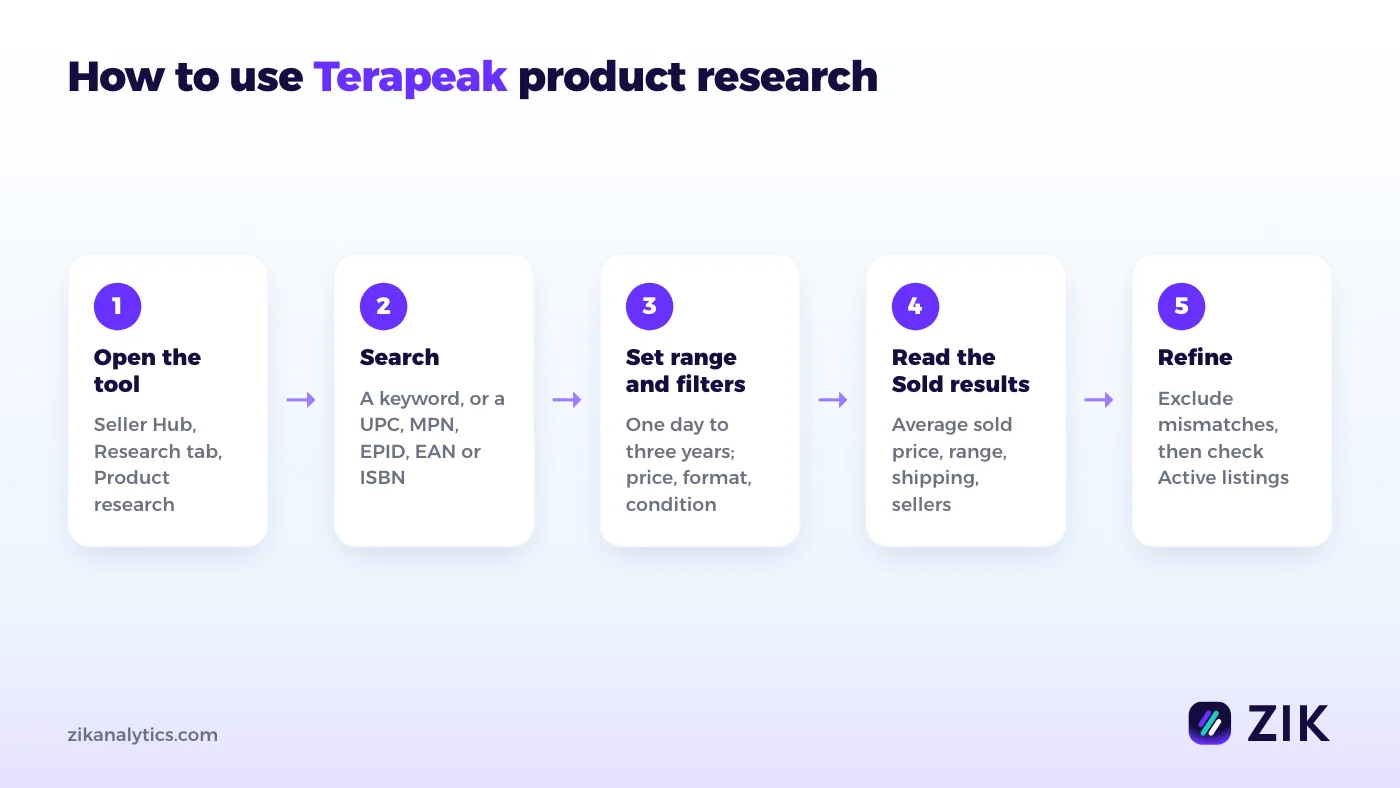
Open Seller Hub, go to Research, then Product research. Search a keyword or product code, set the date range, apply filters, read the Sold results, then exclude listings that do not match your item and check the active competition.
1. Open the tool
On desktop, go to Seller Hub and open the Research tab: Product research is the first option. In the eBay app, open the Selling tab and look for the Product Research banner. eBay's mobile announcement listed sell-through and the active listings view as still to come on the app, so do serious research on desktop.
2. Search the way eBay matches
Search by keyword, or by a product code: UPC, MPN, EPID, EAN or ISBN. eBay's help page says Product research needs closer keyword matches than normal search, so every word you type must appear in the title. Two operators help:
- Exclude a word with a minus sign or AND NOT:
switch pro controller -casedrops the cases. - Combine alternatives with OR:
joycon OR joy-con.
3. Set the date range and filters
Pick any range from one day to three years. Then narrow it with sale price, listing format, condition, buyer and seller location, and eBay marketplace. Picking a category and clicking Apply opens that category's own filters, such as model and color.
4. Read the Sold results
The Sold view gives the summary metrics and the list of sold listings beneath them. Sort that list and scan it, so you see the spread of prices and conditions, not only the average.
5. Exclude mismatches, then check Active listings
Exclude sold listings that are not your item: a bundle, a broken unit, a different model. Then switch to the active listings to see how many sellers you would be competing with today. In the app, Sell one like this starts your own listing from a sold item, for items sold 90 days ago or less.
Is Terapeak free?
Yes. Product research is free to any seller with Seller Hub, and Seller Hub is free once your account has made at least one sale. Only Terapeak Sourcing Insights needs more: a Basic Store subscription or higher.
eBay's Seller Center calls Product research "free to all sellers". The catch is Seller Hub itself: eBay's help page says you need at least one sale to use it. A brand new account with no sales cannot open the Research tab yet.
| Product research | Sourcing Insights | |
|---|---|---|
| Who gets it | Any seller with Seller Hub (one sale or more) | Business sellers with a Basic Store or higher |
| Extra cost | None | None beyond the Store subscription |
| Extra condition | None | $500 or more in sales in a category to see that category |
| What it is for | Sold prices, demand and sell-through for a search | Categories with high demand and low supply, inventory planning |
Sourcing Insights is the part people mean when they say "Terapeak needs a Store". Plain product research does not.
How to read Terapeak's metrics
Terapeak's core metrics are average sold price, sold price range, average shipping and free-shipping share, sell-through rate, total sellers and selling format. Read them together: a high average can hide a few high sales.
| Metric | What it tells you | Watch out for |
|---|---|---|
| Average sold price | What buyers actually paid, including the accepted price on Best Offer sales | One expensive bundle pulls it up; check the range |
| Sold price range | The lowest and highest sale | Wide ranges usually mean mixed conditions or models in the results |
| Average shipping and free-shipping share | What buyers expect to pay for shipping | Price your item plus shipping against these, not the item alone |
| Sell-through rate | How much of what was listed actually sold | Shown only for searches of items sold 90 days ago or less |
| Total sellers | How many sellers made a sale | Many sellers with few sales each means a crowded market |
| Selling format | Auction or fixed price | Mixed formats blend two ways of pricing; filter to the one you will use |
| Sales trends | Sales over the chosen period | A short range can show a spike as if it were normal demand |
The Best Offer detail matters most. eBay lists it as a difference from completed listings search: Product research records the actual price of an accepted Best Offer, the figure buyer and seller agreed. If an item often sells by offer, Terapeak's average is the one to trust.
A worked example: one niche through both views
Per the ZIK Marketplace Index (ZMI), which covers 159.9M tracked US eBay listings, "nintendo switch controller" listings on eBay.com made 4,862 sales and $400,815 in their latest 30 days, pulled 2026-11-16. Three quarters of that revenue came from listings priced $100 or more.
The search counts US eBay listings whose titles contain all three words and that ZMI refreshed in the last 45 days, with each listing's sales over its last 30 days. ZMI tracks active, in-stock, Good 'Til Cancelled listings with at least one sale in that window, so ended and sold-out listings are not in these totals.
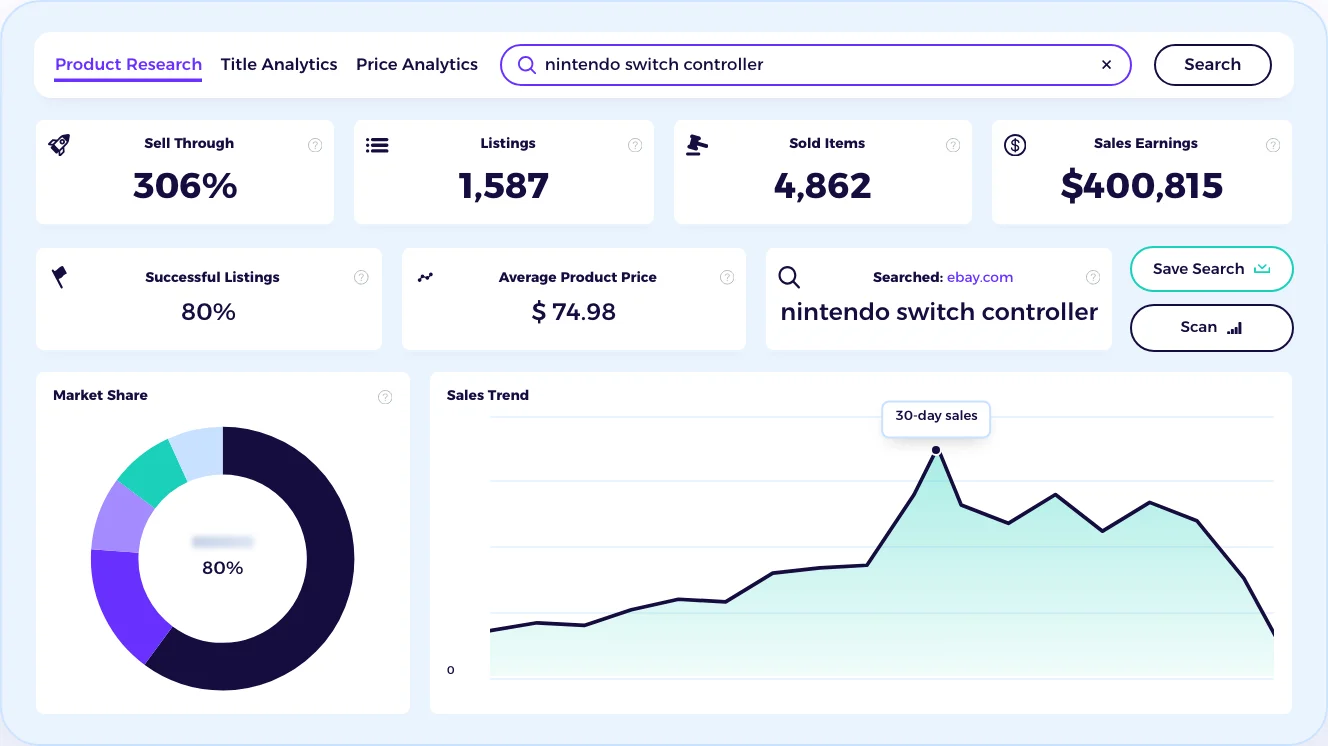
This is the same search run in ZIK's eBay product research software, which shows sell-through, listings, sold items and sale earnings for 7, 14, 21 or 30 days. Here, sell-through is the 4,862 sold items over the 1,587 listings: 306%, because many listings sell more than once. 913 sellers made those sales, and the busiest made 390 sales from 36 listings.
| Price band | Listings | Sales in 30 days | Revenue in 30 days |
|---|---|---|---|
| Under $30 | 820 | 2,382 | $46,087 |
| $30 to $100 | 447 | 1,003 | $53,539 |
| $100 and over | 320 | 1,477 | $301,189 |
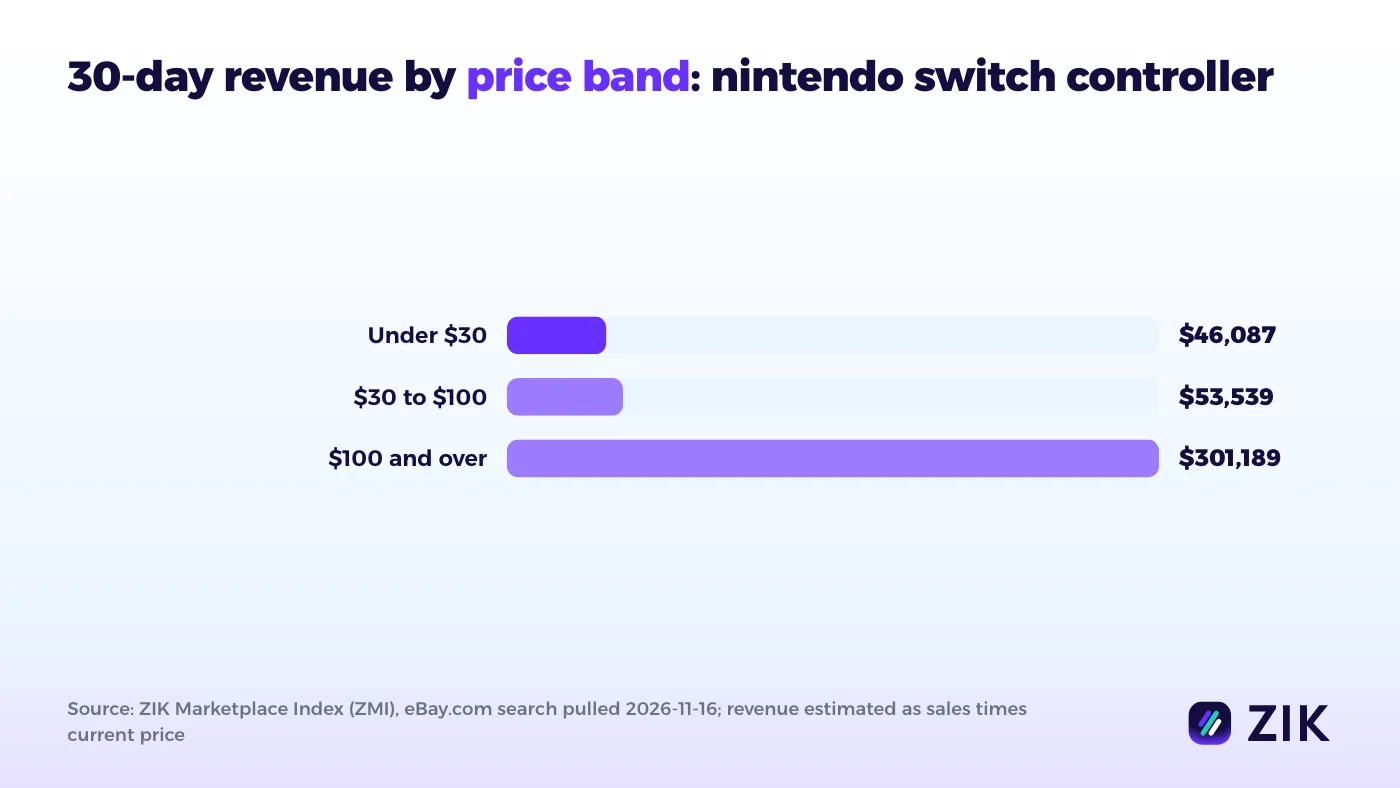
Source: ZMI, pulled 2026-11-16. Revenue is each listing's sales times its current price, so treat it as an estimate.
Two things stand out. Low-priced controller pairs sell in volume: one $24.99 left-and-right pair sold 258 times. But the money is in the $100+ listings. The four best-selling listings priced $100 or more were all the Nintendo Switch 2 Pro Controller Legend of Zelda 40th Anniversary edition, at $169.99 to $179.99, with 432 sales between them; one made 150 of its 175 sales in the last 7 days.
Condition splits the market too. New listings made 2,765 sales from 758 listings, open box 480 from 156, and used 452 from 387. A used controller listing averaged about 1.2 sales a month.
What Terapeak would answer for the same search
You cannot judge that 7-day burst from 30 days of data. That is where Terapeak earns its place, and here is which field answers which question:
- Does the Zelda controller demand last? Set Sales trends to one year and look for earlier spikes and how fast they faded.
- What do used controllers really sell for? Filter Condition to Used and read the sold price range, which includes accepted Best Offers.
- How crowded is it? Compare Total sellers with the Active listings count for the same filters.
ZIK answers who is selling now and how fast; Terapeak answers what it sold for and whether demand repeats. Run both before you buy stock.
Where Terapeak stops and what ZIK adds
Terapeak is eBay's own free source of price history, built around one search on eBay. It does not analyze a particular competitor's store or match a supplier. ZIK adds both, but covers only the last 30 days.
Terapeak's strengths are real: three years of history, ended and sold-out listings included, Best Offer prices, and no cost. Its limits come from the same design. eBay's documented filters cover the item, price, format, condition, location and marketplace, not a particular seller. Sell-through stops at 90 days, and the data is eBay's alone.
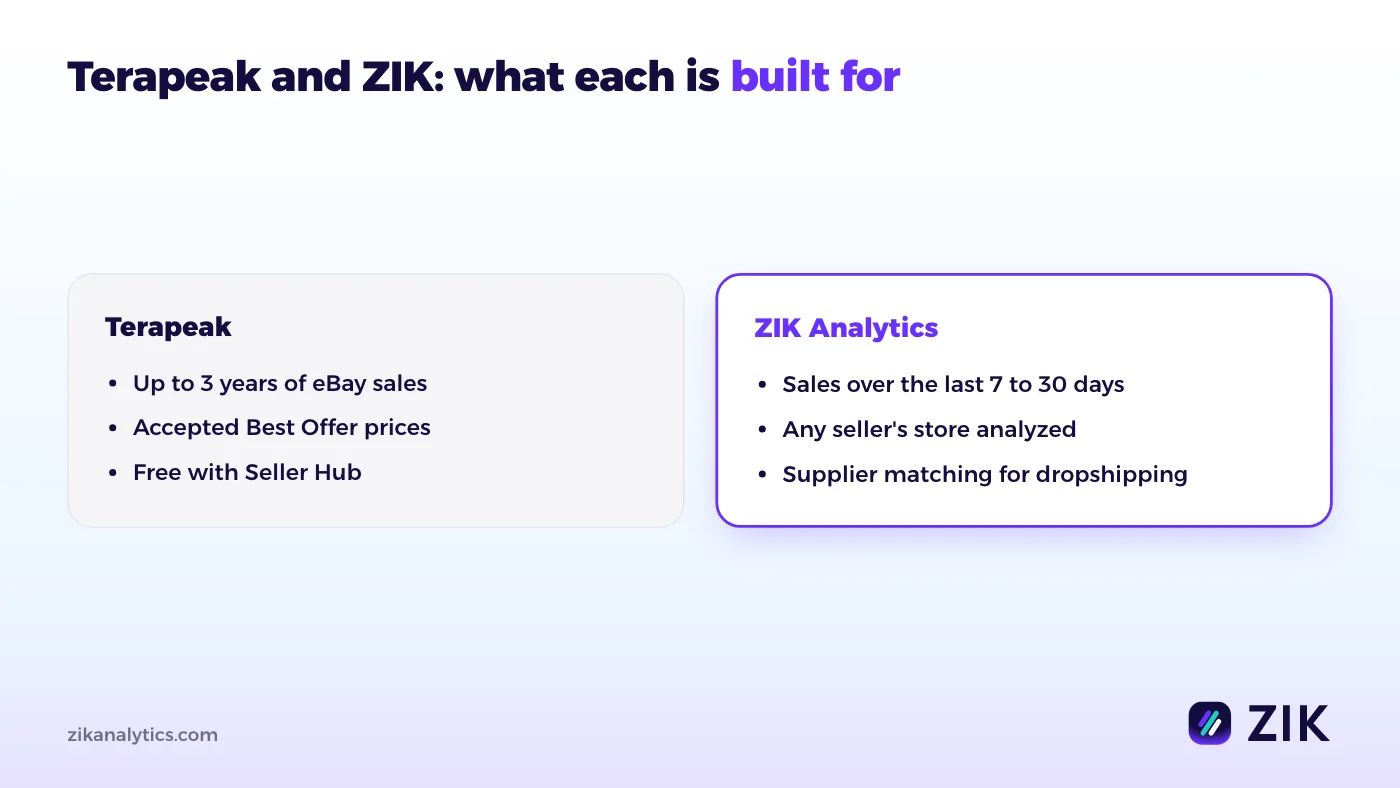
ZIK covers the jobs Terapeak does not:
- One competitor's whole store. ZIK's competitor research tool for eBay shows any seller's sell-through, active listings and sale earnings over 7, 14, 21 or 30 days.
- A supplier for the item. The Dropshipping Product Finder matches products to suppliers such as Amazon, Walmart, AliExpress, Alibaba and CJ, with margin and ROI.
- Variations counted together. ZIK adds every variation's sales (sizes, colors, styles) into its listing's total.
The honest trade-off: ZIK does not track ended or out-of-stock listings, so its sold counts can run below Terapeak's, and it has no history beyond 30 days. If you are weighing other tools, see Terapeak alternatives, or ZIK Analytics and Terapeak side by side.
Common mistakes with Terapeak research
- Searching too broadly. "Controller" mixes every console. Every word must match, so add the model and exclude accessories with a minus sign.
- Trusting the average alone. Check the sold price range and the condition filter before you price.
- Reading a short window as demand. A 7-day or 30-day view can catch a launch spike. Stretch the range to a year.
- Ignoring shipping. Buyers compare the item price plus shipping. Read the average shipping and free-shipping share.
- Forgetting the competition. Sold results show demand; the active listings show who you are up against.
Research eBay products with ZIK Analytics
Terapeak tells you what an item sold for. ZIK Analytics tells you who is selling it this week and how fast: sold items, sell-through and sale earnings for any keyword over 7 to 30 days, any competitor's store, and a supplier match when you dropship. ZIK's own guidance for beginners is an item with at least 2 sales in 7 days and no more than 5 competitors. Check your next product against it with a $1 trial.
Frequently asked questions
Can you see the best offer accepted on eBay?
Yes, through Product research in Seller Hub. Search the item and read the Sold results: eBay records the accepted offer amount there, which its completed listings search does not.
Which tool is best for product research on eBay?
It depends on the question. Terapeak is best for price history over up to three years. ZIK's eBay Product Research Tool is built for current demand: who sold an item in the last 7 to 30 days, how often, and at what price.
What happened to Terapeak?
eBay renamed it. The tool is now called Product Research on Seller Hub and in the eBay app, and it works the same way: Seller Hub, then the Research tab.
How far back does Terapeak go?
Up to three years of eBay sales, for any period from one day. Sell-through rate is shown only for searches of items sold 90 days ago or less.