
Yes, you can sell digital products on eBay if you legally own the content or have the right to sell it.
This means the item must be your original work or something you purchased with resale rights.
You cannot, however, sell pirated content, digital access codes, or unauthorized copies of software, movies, or music.
Below, I share everything you need to know about the question can you sell digital products on eBay.
You’ll also find a list of products that you can start selling electronically while staying compliant with the platform’s rules.
eBay’s Digital Goods Policy Explained
eBay has a policy for digital goods that states you need to be an approved seller to list electronically delivered items in most categories.
For this, you need to have a registered eBay account in good standing with a US address and a valid selling account.
The alternative way is to use the Everything Else > Information Products category with the Classified Ad format that doesn’t require approval.
This costs $9.95 for a 30-day listing with no final value fees. However, it doesn’t come with the eBay Money Back Guarantee that the platform offers to approved sellers.
Other things to note:
- You must legally own or have explicit permission to sell the digital content
- Items must be delivered electronically only via email or download link
- You cannot offer local pickup for digital goods
- You cannot charge shipping fees for digital items
- Violating the policy can result in account suspension or removal without warning
Types of Digital Products You CAN Sell on eBay
eBay allows several types of digital products as long as you follow their guidelines. Here are the main categories you can sell:
Physical Items with Digital Components
Think software CDs, game DVDs, or any product that has digital content stored on physical media. You can list these in standard categories without approval since they involve shipping a physical item. Buyers of these products typically receive both the tangible media and access to the digital content stored on it.
Digital Services and Consultations
If you specialize in professional services of any kind, you can package them as a digital product and sell on eBay. For example, you might be a web designer offering site audits or a marketing consultant selling strategy sessions. You can list these in the Classified Ad format, and buyers will contact you directly to arrange the work.
Types of digital services you can sell:
- Website design packages
- Online tutoring or coaching sessions
- Social media management consultations
- Business strategy calls
Digital Templates and Tools
These are some of the best digital products to sell on eBay. You can take inspiration from existing templates or create your own based on what you’re skilled at making. Tools like Canva are available to help you design professional-looking templates even without design experience.
Here’s what sells well:
- Printable planners and organizers
- Business templates like invoices or proposals
- Social media content calendars
- Budget trackers
Educational Content and Courses
Educational materials like online courses and training guides also tend to sell well on eBay. When making this digital content, make sure to utilize formats that are easy to consume like PDFs or video files.
Types of educational products you can sell:
- Step-by-step tutorial guides
- Video training courses
- Language learning materials
- Skill development workbooks
Note that you must comply with eBay’s policies by owning the content or having explicit permission to sell it.
How to Sell Digital Products on eBay
Now that you know what types of digital products you can sell, here’s how to set them up on eBay.
Step 1: List the Digital Goods in the Correct Category
Start by logging into your eBay account. Once in, click Sell at the top of the page and select List an Item.
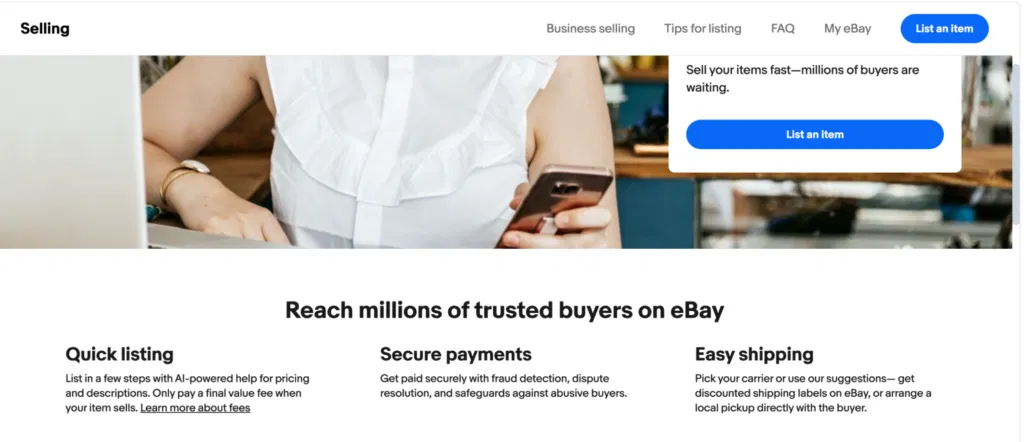
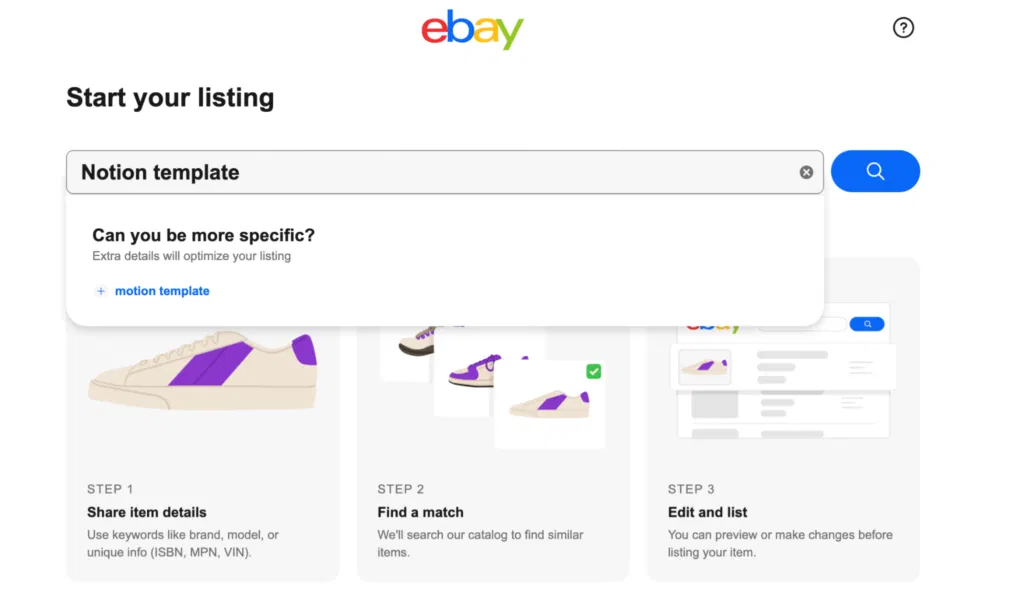
eBay will now ask you to tell them what you plan on selling.
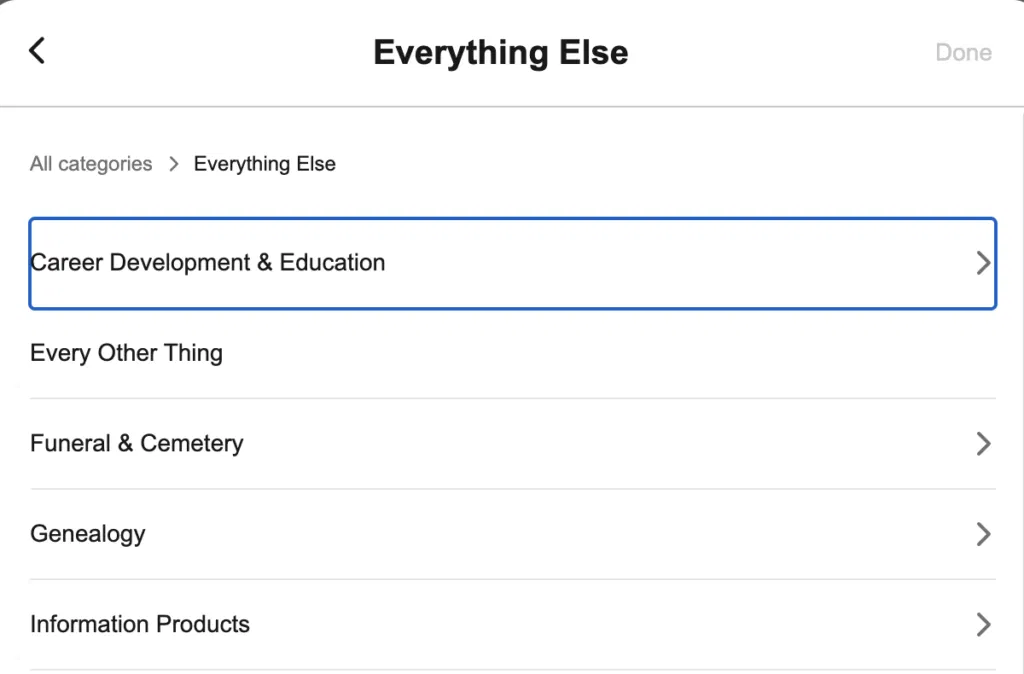
Scroll down and choose Everything Else → Information Products.
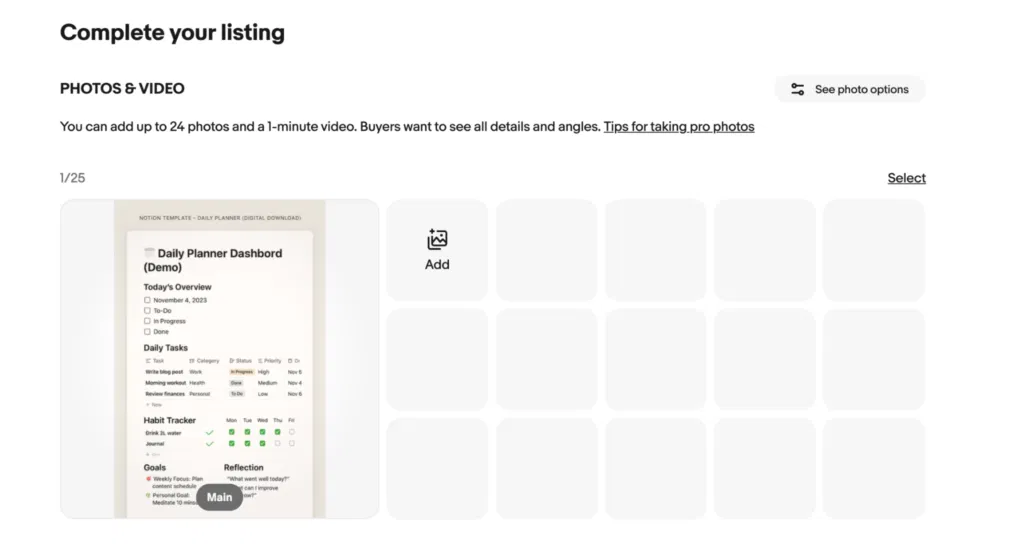
Step 2: Upload Photos of the Item
You’ll now see a screen asking you to upload images. Click Upload from computer and add 2–4 preview photos of your digital product.
You can also upload a short demo video (up to 1 minute) if you want to show how your template works. Be sure to keep the visuals bright and readable so that people can easily grasp what’s on the screen.
Step 3: Add a Descriptive Title
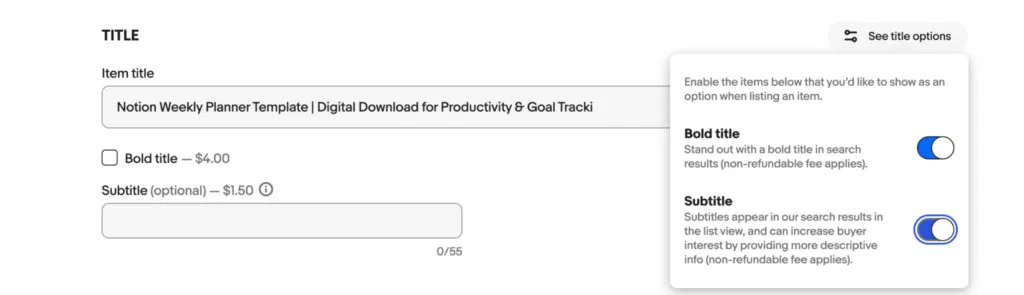
Next, you’ll be asked to create an eBay title, for your product. This is the first thing buyers see in search results, so make it specific and descriptive.
For example:
Notion Weekly Planner Template | Digital Download for Productivity & Goal Tracking
You’ll also want to add a few keywords to make sure your listing is optimized for eBay SEO.
Next, you’ll see options to make your title bold or add a subtitle. These come with a small non-refundable fee that you need to pay to eBay. I suggest skipping them for now and entering just the title.
Step 4: Fill in Item Specifics
Scroll down to Item specifics. Here, you’ll see a bunch of fields that you can fill out to help buyers understand what they’re getting.
Here’s how you can fill it out for a Notion template:
- UPC: Leave this blank.
- California Prop 65 Warning: Leave blank; it’s not relevant to digital files.
- Country of Origin: Select your country (e.g., USA).
- Format: Type “Digital download (Notion template).”
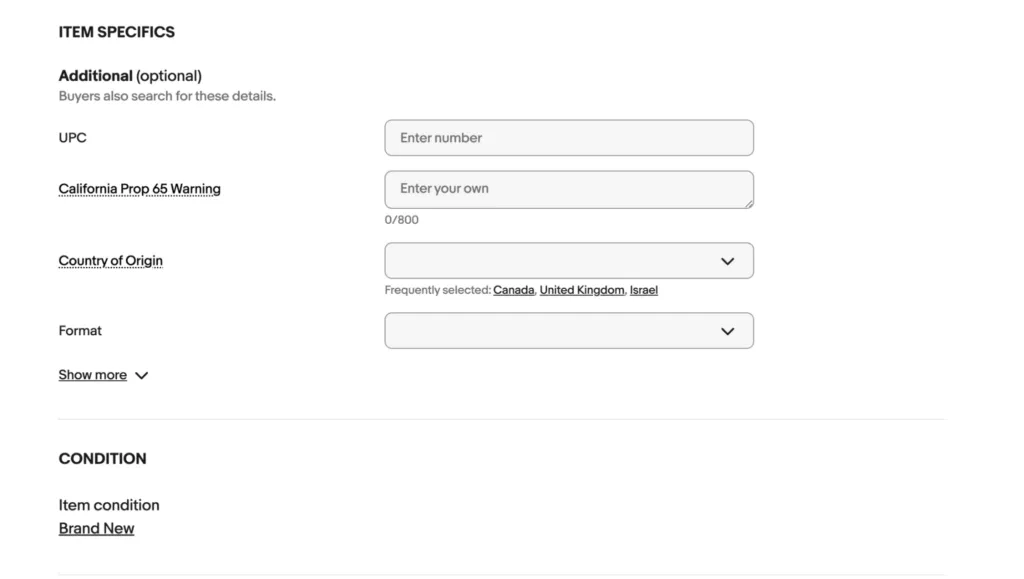
That’s enough to make your listing clear and searchable.
Step 5: Write a Description and Choose Pricing + Format
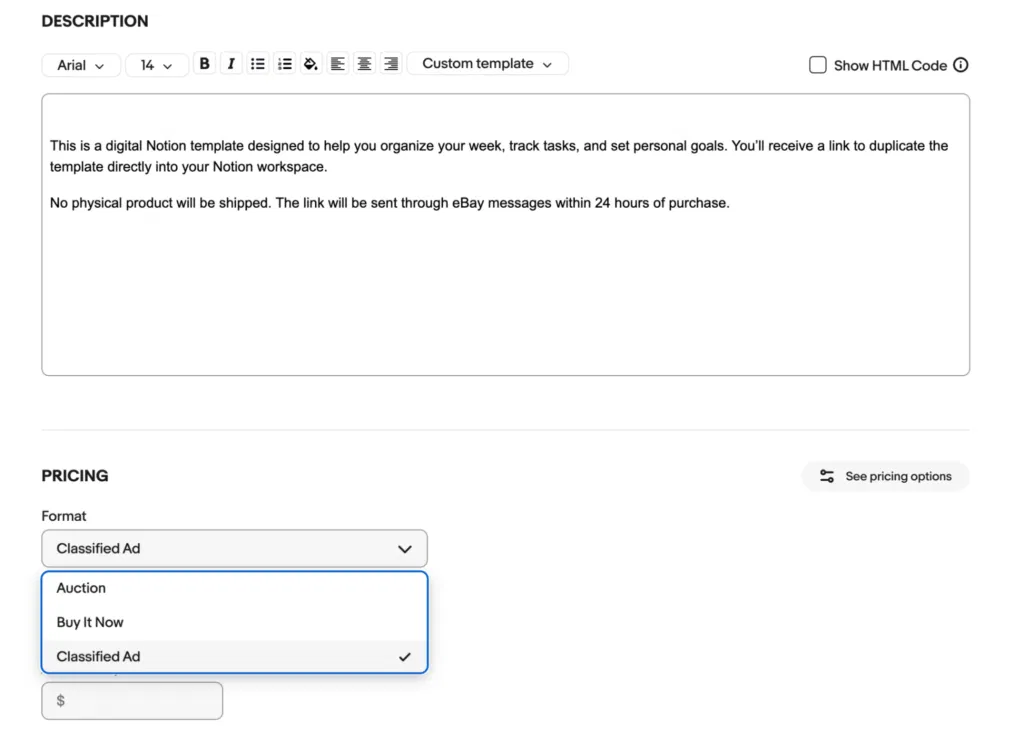
In the description box, write a short, honest overview of your product.
Example:
This is a digital Notion template designed to help you organize your week, track tasks, and set personal goals. You’ll receive a link to duplicate the template directly into your Notion workspace.
No physical product will be shipped. The link will be sent through eBay messages within 24 hours of purchase.
You can use the text tools (bold, lists) to make it easier to read. Check out our guide to eBay listing optimization for more insights on how to create better listings.
Under Pricing, set the Format to Classified Ad. This prevents eBay from adding a shipping section and ensures you aren’t charged a shipping-related fee. Note that the platform charges a flat insertion fee (around $9.95) for this type of listing.
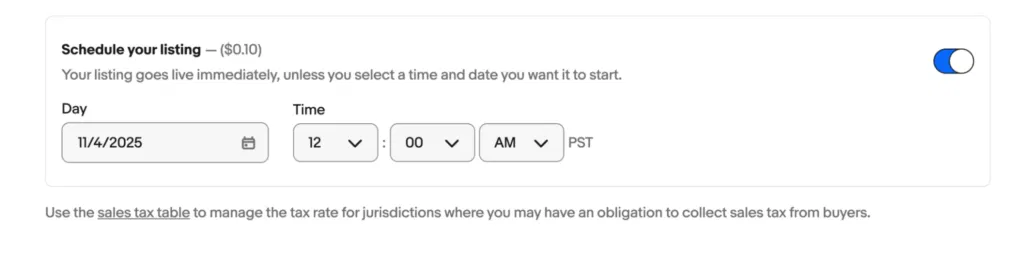
You can also choose to schedule your listing for a specific time and day. There’s a small $0.10 fee to do so.
Step 6: Review and Publish
Before listing, double-check your details:
- Correct category: Everything Else → Information Products
- Format: Classified Ad
- Description: clearly states “digital download”
- Photos: high-quality previews
When you’re ready, click List it at the bottom. eBay will then charge the listing fee and post your digital product live.
How to Sell Digital Products on eBay Without Paying a Shipping Fee
To avoid paying a shipping fee when selling digital products on eBay, you should list the item under “Everything Else > Information Products” and use the “Classified Ad” format. With this method, you prevent eBay from adding shipping costs since the product is delivered online.
You’ll still need to pay a small listing fee, but you can be sure that there will be no extra charges applied for shipping.
Common Challenges of Selling Digital Products on eBay
Selling digital items on eBay comes with a few hurdles you’ll need to manage. These include:
- Strict digital product policies: eBay doesn’t allow automated downloads, and all digital products must be listed under Everything Else → Information Products. You’ll need to follow this step carefully to avoid penalties.
- Manual file delivery: Unlike Etsy or Gumroad, eBay doesn’t support instant digital downloads. You have to send the file manually to each buyer after payment, which can be time-consuming if you get multiple orders.
- Piracy and content theft: Digital files are easy to copy and share without permission. You should consider using watermarks or password-protected links to protect your files.
- Visibility in search results: Digital listings often get buried under other categories. You can improve yours by using clear keywords in your title and uploading quality preview images.
Pro tip: If you find that someone has stolen your digital artwork or content, you can report them directly via the platform. Read how to report a buyer on ebay for a step-by-step.
Is it Worth Selling Digital Items on eBay?
Yes, it is worth selling digital items on eBay. The platform gives you access to a massive customer base and tools to make your listings stand out.
However, it’s not as easy as uploading a file and calling it a day.
You need to familiarize yourself with eBay’s policies for digital goods. For example, the platform expects you to use the Classified Ad format or request pre-approval for certain types of products. You also need to clearly state that the item is digital to prevent confusion or refund claims.
Once you’re familiar with these rules, you can start listing confidently. Be sure to write clear descriptions and set proper delivery terms. Items you can sell include e-books, templates, software, and digital art, among others.
Can I Sell Digital Art on eBay?
Yes, eBay allows you to sell digital art on its platform. However, it has specific rules in place for those interested in selling these kind of products. The main requirements are that you must list your digital art in the “Everything Else > Information Products” category and deliver the final product electronically (via a secure download link).
You can start by creating a digital product such as printable wall art. Tools like Canva make it simple to design and share your creations. Make sure to upload high-quality images and write a compelling description, as buyers mainly rely on these details to decide what to purchase.
You can decide to list your digital art using the Auction or Buy It Now format. If you end up selling a chunk, consider offering print-on-demand versions of your work to earn extra income.
Using ZIK Analytics to Sell Digital Products on eBay
Selling digital products on eBay is a profitable but challenging endeavor that requires a lot of effort.
ZIK Analytics makes it easier with tools designed for upcoming sellers. Our eBay product research tool shows you which items are generating sales and helps you spot trends before they peak.
You can also check out successful sellers using our eBay competitor research tool. See what items they’re selling, how much money they’re making, and the price range.
Stop worrying about what to sell or how to price your digital products. ZIK gives you the data you need to make informed decisions. Try ZIK Analytics today.
Frequently Asked Questions About Can You Sell Digital Products on eBay
In this section, I’ll answer the frequently asked questions about selling digital products on eBay.
What is the best platform to sell digital products?
The best platform to sell digital products depends on your goals. Gumroad and Etsy are great for beginners selling printables or creative downloads. Shopify works best if you want full control over branding and pricing. For courses or eBooks, consider Thinkific, Udemy, or Amazon to access large, built-in audiences.
What products cannot be sold on eBay?
Some of the products you can’t sell on eBay include adult items, hazardous materials, weapons, and drugs. eBay also removes listings that promote illegal activity or breach its VeRO policy, like counterfeit or trademarked goods. You’ll also want to check category guidelines to make sure restricted products meet eBay’s listing rules.
What’s the most profitable thing to sell on eBay?
Some of the most profitable things to sell on eBay include vintage collectibles, electronics, and branded fashion items. These products tend to do well because of their lasting appeal compared to everyday goods. eBay’s global reach also helps sellers connect with collectors and niche buyers willing to pay premium prices.