
Running a dropshipping store comes with a set of responsibilities that can quickly become overwhelming.
From processing orders to syncing inventory to answering customer messages, you can quickly find yourself struggling to get a handle on things.
That’s where dropshipping automation comes in.
Dropshipping automation handles repetitive work so you get more time to focus on finding better products and increasing sales.
Below, we take a closer look at what dropshipping automation is and how you can use it streamline your operations.
What is Dropshipping Automation
Dropshipping automation is the process of using technology to handle repetitive tasks so you don’t have to do them manually. It involves using tools like order management software and inventory syncing apps to streamline operations and reduce errors. Dropshippers who automate their workflows save time and scale their businesses more efficiently/
Benefits of Dropshipping Automation
Dropshipping automation offers several advantages over manual operations, including:
Improved Productivity
When you automate order processing, inventory updates, and customer notifications, you free up time to focus on growing your business. You can spend that time finding winning products and testing dropshipping marketing strategies. With users of AI and automation reporting an average savings of 2.2 hours per week, you can put those hours toward things that make you money.
Reduced Errors
How many times have you entered the wrong shipping address or updated inventory counts incorrectly? Dropshipping automation keeps you from making these mistakes. It also keeps your stock levels accurate and gets order confirmations out to customers right away.
Easier to Scale
It’s not easy to handle 100 orders per day when you’re processing everything yourself. Dropshipping automation handles the extra orders for you. Whether you’re fulfilling 10 orders or 1,000, you can grow without needing to hire anyone or work around the clock.
Lower Costs
Automation tools charge monthly fees, but they cost far less than paying someone for manual work. You also avoid expensive Shopify errors like selling items that are out of stock. About 75 percent of stores using automation across multiple tasks report higher profits, meaning these tools often pay for themselves.
Best Ways to Automate Your Dropshipping Business
There are several ways to automate your dropshipping business and reduce your workload. Here are some of the best:
Way 1: Automate Dropshipping Product Research
Perhaps the most time-consuming part of running a dropshipping store is finding products that actually sell. You need to browse suppliers, check sales data, and compare margins before you know if something is worth testing. It all takes hours before you even list your first item.
ZIK Analytics is dropshipping automation software that automates the product research process for you. Our Shopify Product Explorer gives you sales estimates and supplier matches for any item you want to sell. You also get a list of trending products and can use filters to narrow down results and find the best products for dropshipping.
To automate dropshipping product research with ZIK:
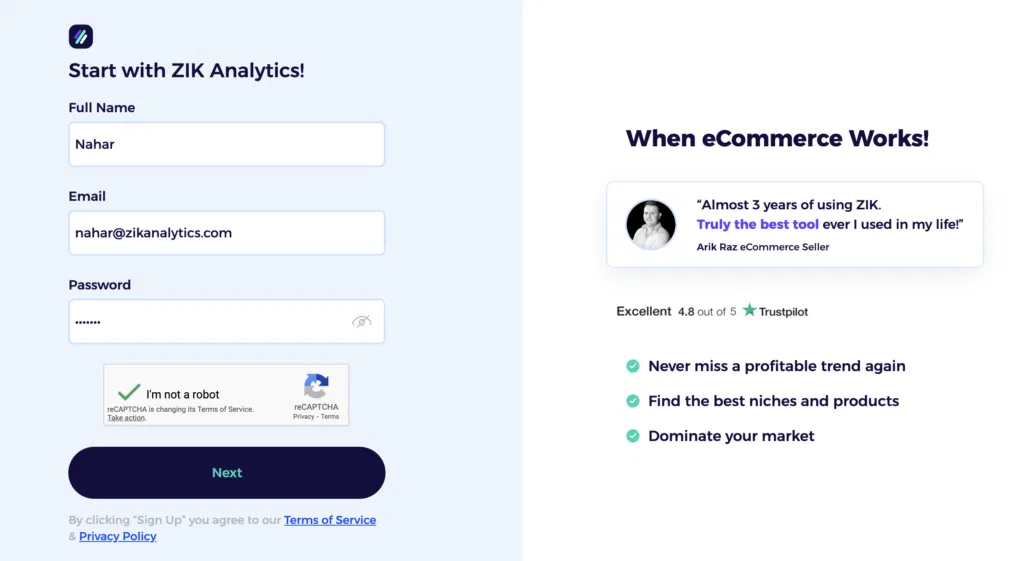
- Sign up for an account: Create a ZIK Analytics account to access the research tools.
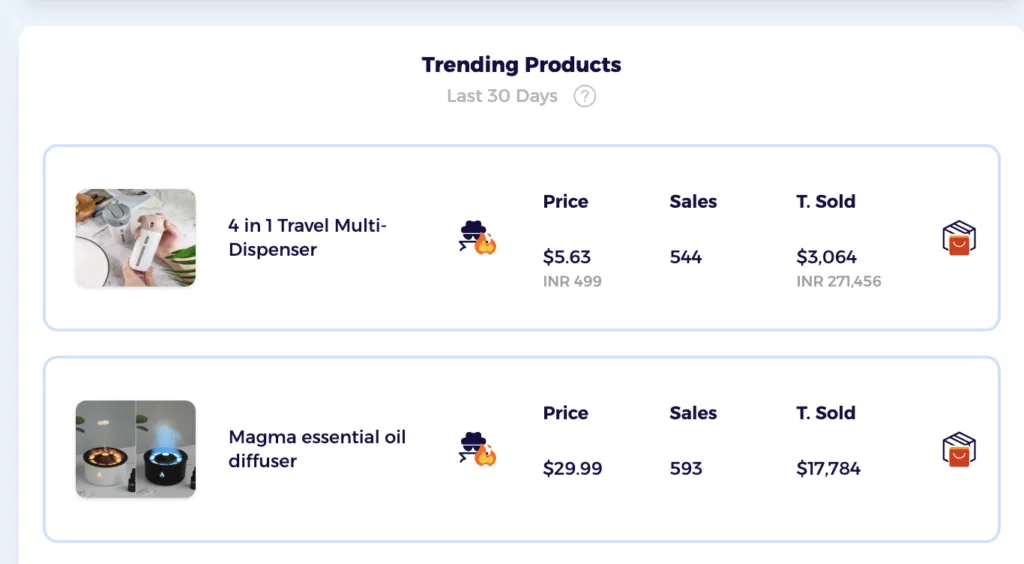
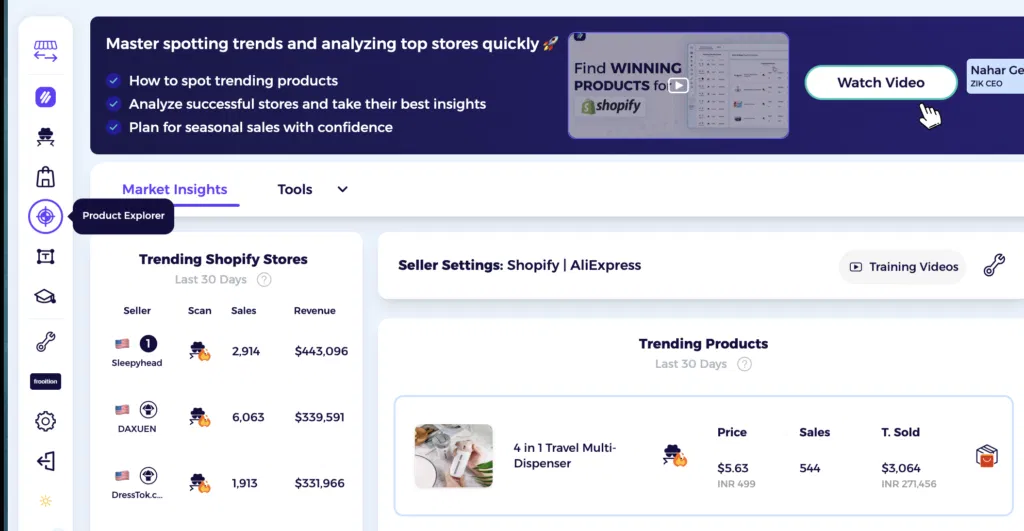
- Check trending products: Find a list of hot-selling products on the dashboard to get initial ideas for your store.
- Open Shopify Product Explorer: Click the explorer tool in the left tab if you want to dig deeper into specific niches.
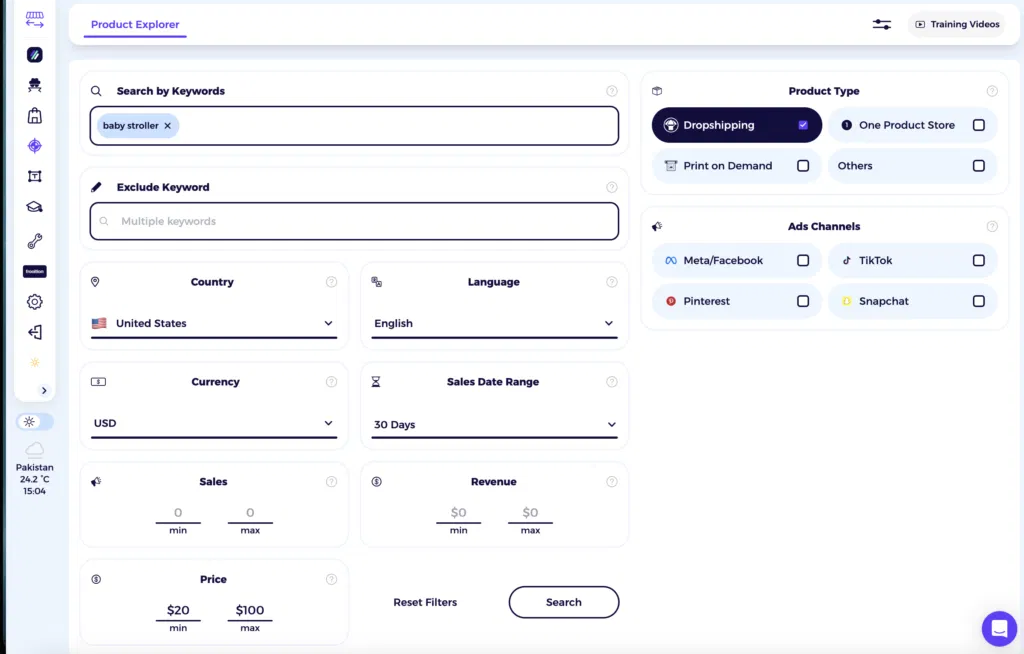
- Search and filter: Enter keywords like “baby stroller” and set filters for sales volume, revenue range, price, and product type.
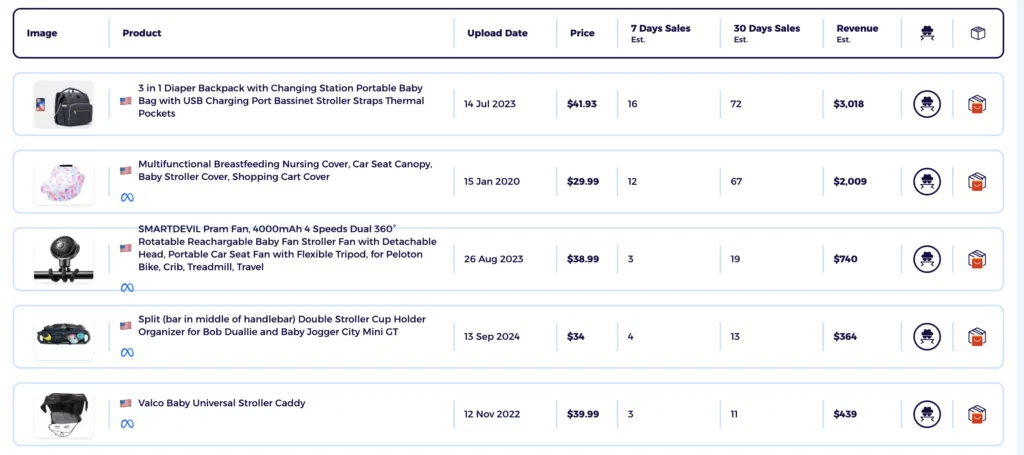
- Review results: ZIK shows you products with 7-day and 30-day sales estimates, revenue data, upload dates, and prices so you can spot winning items fast.
ZIK connects with store automation tools so you can export researched products with supplier links and pricing data directly to your listing platform. This cuts the time between finding a product and getting it live in your store.
Way 2: Import Products Into Your Store
You’ll probably need to add dozens of products to your dropshipping store before you find what sells. Doing that manually is time-consuming and leaves room for errors (like missing images or copying the wrong price).
AutoDS automates product importing so you don’t need to transfer any details yourself. The tool pulls everything from your supplier and adds it to your store in seconds.
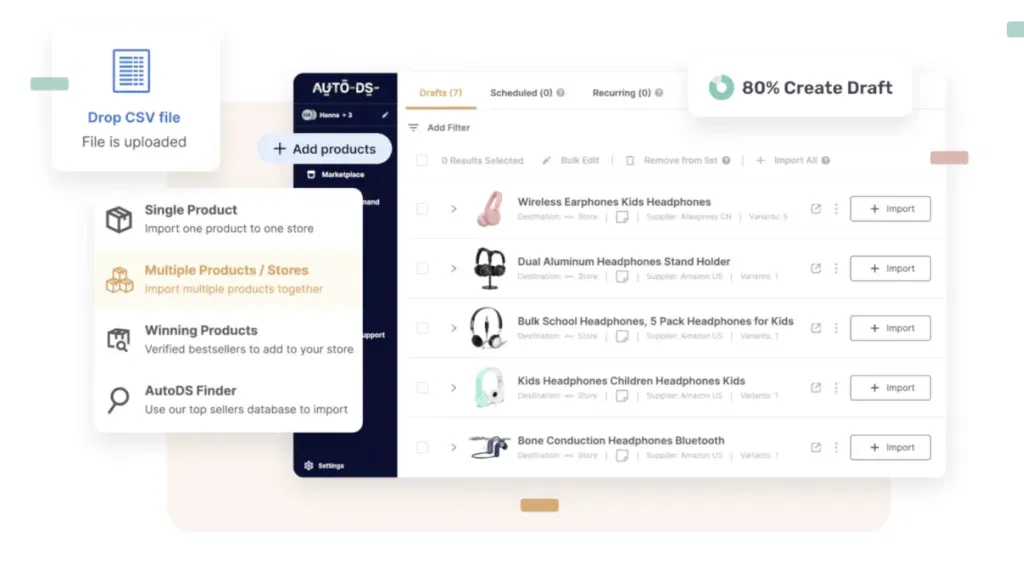
You can import single products by pasting a URL or bulk import multiple products at once. The Chrome extension lets you import directly from AliExpress, making it easy to populate your store.
Here’s how to set up automated product imports with AutoDS:
- Install AutoDS and connect your store: Add the app to Shopify and link your supplier accounts.
- Import products: Paste URLs into AutoDS or use the Chrome extension while browsing.
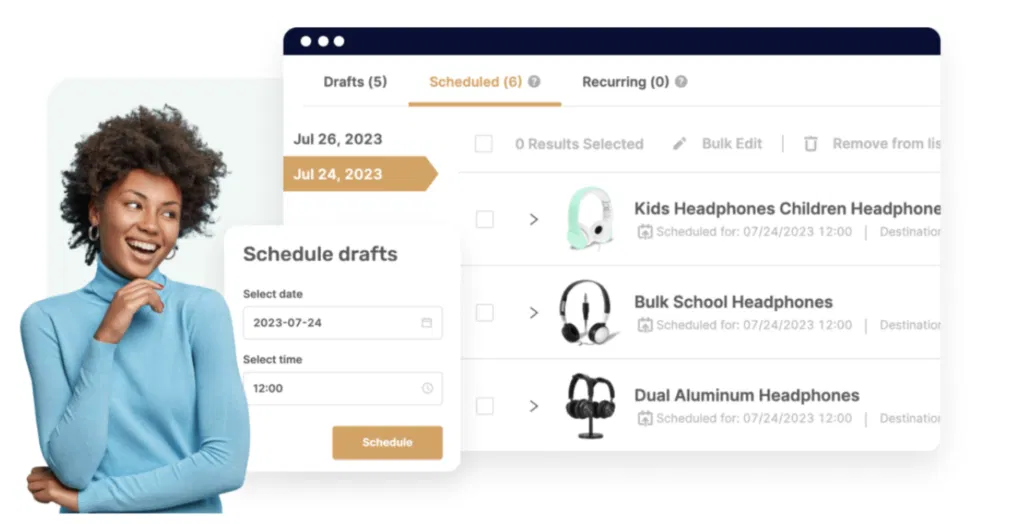
- Edit in drafts: Products save to drafts so you can adjust titles and prices before publishing.
- Set your pricing rules: Configure profit margins so products import with your pricing built in.
AutoDS flags copyrighted items so you avoid listing trademarked products. Once you’re ready, you can publish products to your store or schedule them to go live later.
Way 3: Automate Order Fulfillment
Order fulfillment can take a toll on your schedule with all the copying of customer addresses and updating tracking numbers manually. Fortunately, you have apps like DSers to give you some breathing space.
With DSers, you can connect your Shopify store to suppliers like AliExpress so orders sync automatically. Then, you let the app handle moving orders through each stage from payment to shipment. DSers pulls tracking numbers from suppliers and updates your store without you checking back constantly.
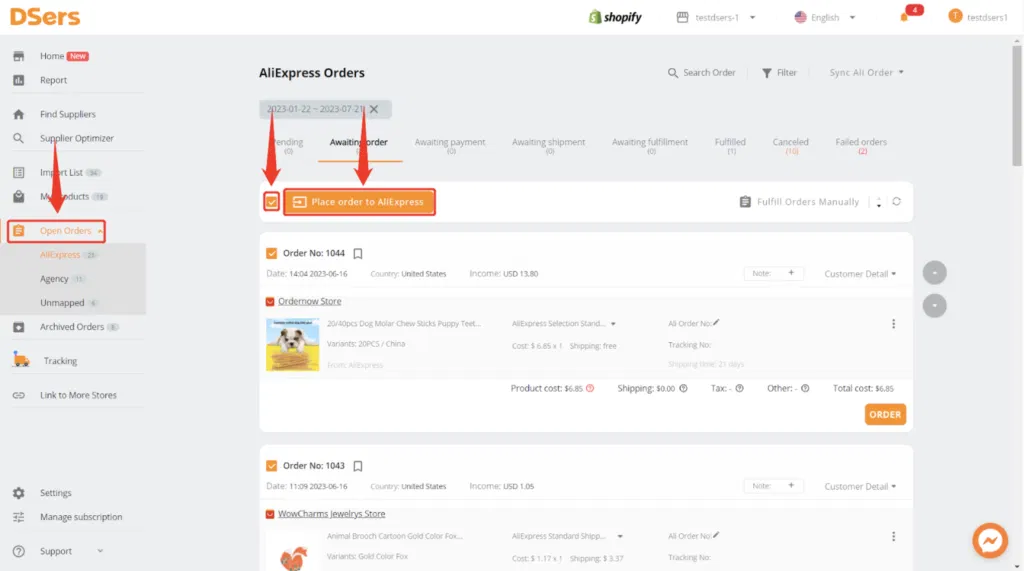
Here’s how to set up order fulfillment automation with DSers:
- Install DSers and link accounts: Add DSers to Shopify and connect your AliExpress account.
- Import products to your store: Find items through DSers and push them to Shopify.
- Turn on automatic updates: Enable settings so DSers marks orders as fulfilled and sends tracking emails to customers when suppliers ship.
Once you place and pay for an order through DSers, the app takes over and handles status updates and customer notifications. For those looking to get into AliExpress dropshipping, DSers makes it easy to get started.
Get the eBook and learn how to launch your one-product Shopify store right!Way 4: Automate Inventory & Price Updates
Keeping track of inventory and prices is one of the most tedious aspects of Shopify dropshipping. You need to make sure items are still in stock with your supplier and that prices haven’t changed, or you risk selling products you can’t fulfill or losing money on orders.
AutoDS handles this by monitoring your suppliers around the clock and updating your store when stock levels or prices change. If a supplier runs out of stock, AutoDS marks the product as unavailable. When it comes back, the product goes live again. If your supplier raises their price, AutoDS adjusts your listing based on the profit rules you set.
Here’s how you can set it up:
- Connect your store: Add your Shopify store and give AutoDS permission to sync products and inventory.
- Link your products: Sync existing listings or import new products from supplier URLs.
- Set pricing rules: Choose your profit margins and dynamic pricing for different price ranges.
- Configure stock monitoring: Set minimum stock levels and maximum shipping days.
- Let it run: AutoDS monitors suppliers every hour and updates your store automatically.
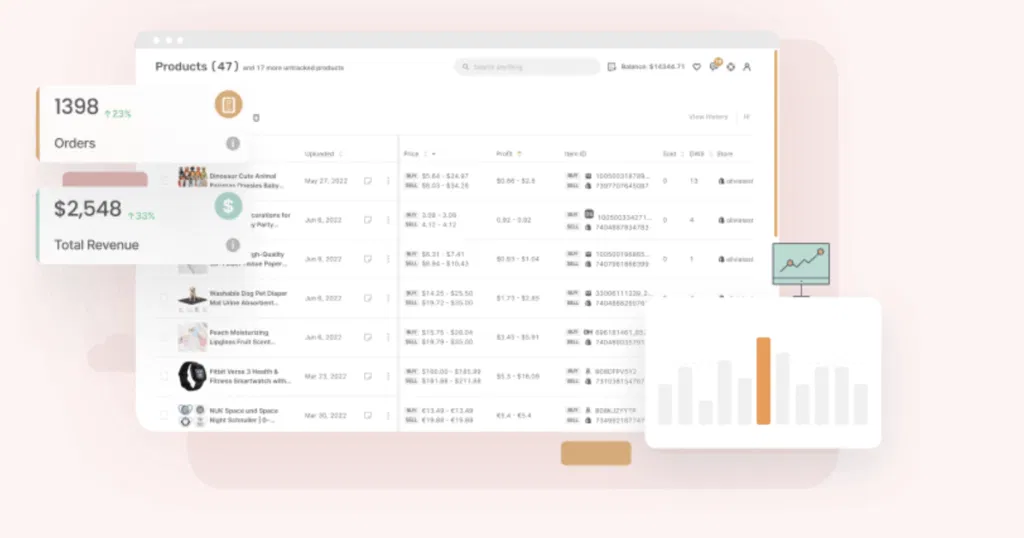
You can also round prices to .99 cents or add slash pricing to show discounts. Once configured, you stop losing money on price increases and avoid selling out-of-stock items.
Way 5: Customer Support
When you first start dropshipping, you might get by just fine handling customer questions on your own.
But when your store starts growing and orders pick up, customer messages can pile up fast.
Automation can help you keep up without hiring a support team. You can use AI to handle the repetitive questions and save time for work that grows your business.
Willdesk is an automation tool you can use to manage customer support for your Shopify dropshipping store. The tool uses AI to answer common questions and brings messages from email, Instagram, Facebook Messenger, and WhatsApp into one inbox.
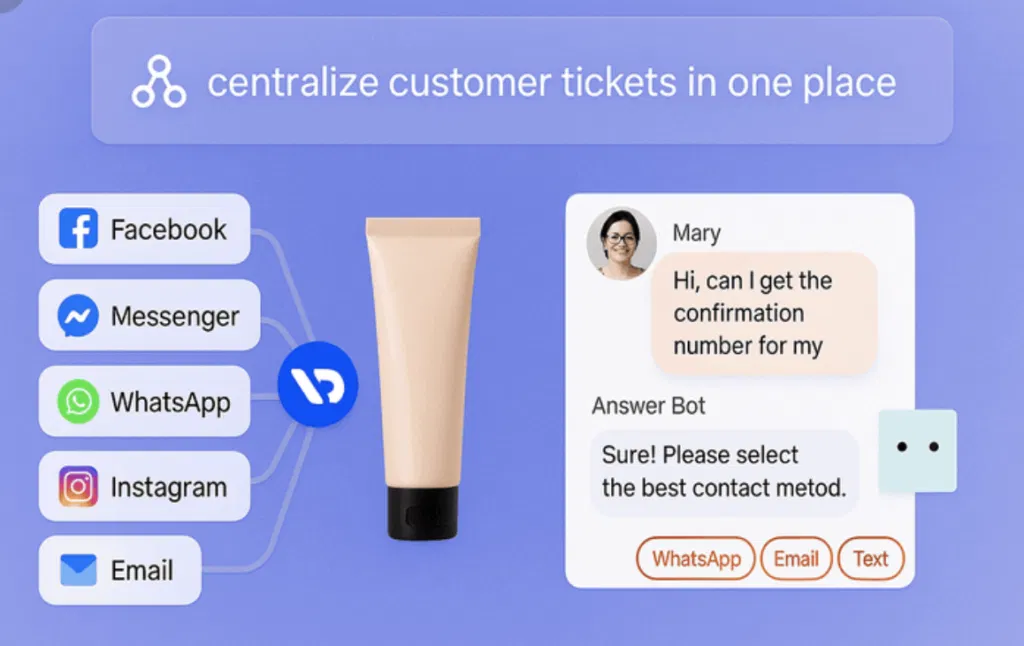
To set up automated customer support for your Shopify store:
- Install Willdesk and connect your channels: Add the app to Shopify and link your messaging accounts.
- Build your knowledge base: Add Q&As and links to policies like refunds and shipping so the AI can answer questions.
- Enable AI templates: Turn on automation for order tracking and post-purchase support so customers get help right away.
- Set up cart recovery: Automatically message customers who abandon carts and offer discounts.
With 59% of consumers stating that customer service can matter more than a product’s price, automating your support can help you respond faster and maintain customer satisfaction as your business grows.
Way 6: Automate Marketing Campaigns
Marketing a dropshipping business requires testing different ad creatives, writing copy that converts, and keeping an eye on what successful competitors are running.
The competitor analysis part is something you can now automate with ZIK Analytics’ AdSpy tool.
Inside AdSpy, you can paste any Shopify store URL and see every Instagram and Facebook ads for dropshipping they’re currently running.
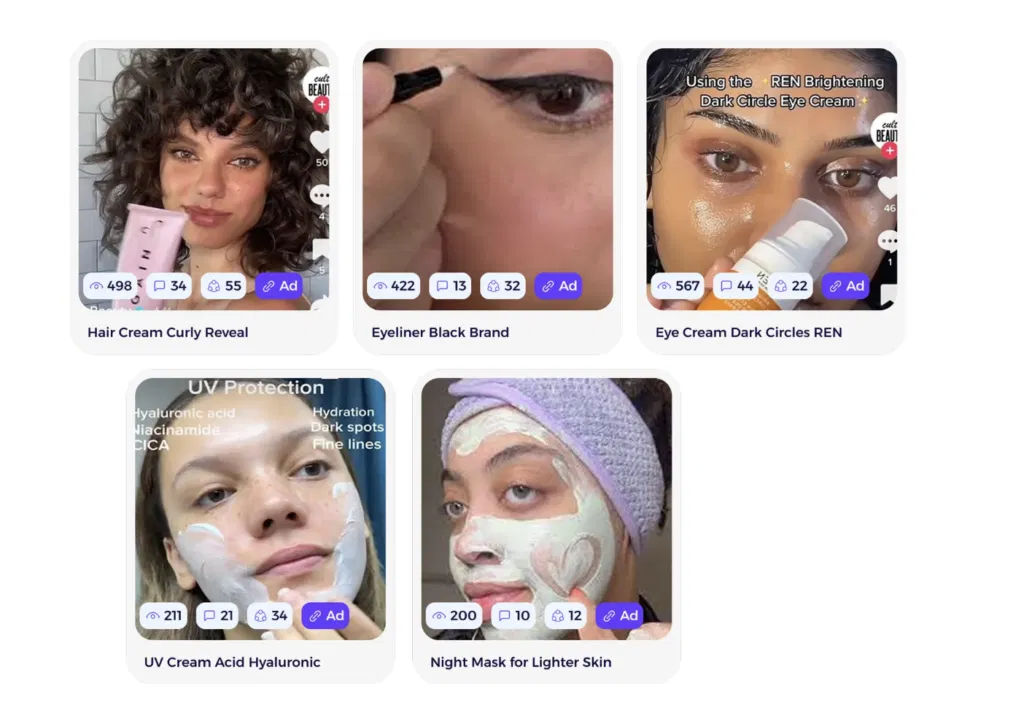
The tool lets you see their ad creatives, copy, and landing pages so you can reverse engineer the campaigns that are bringing them business.
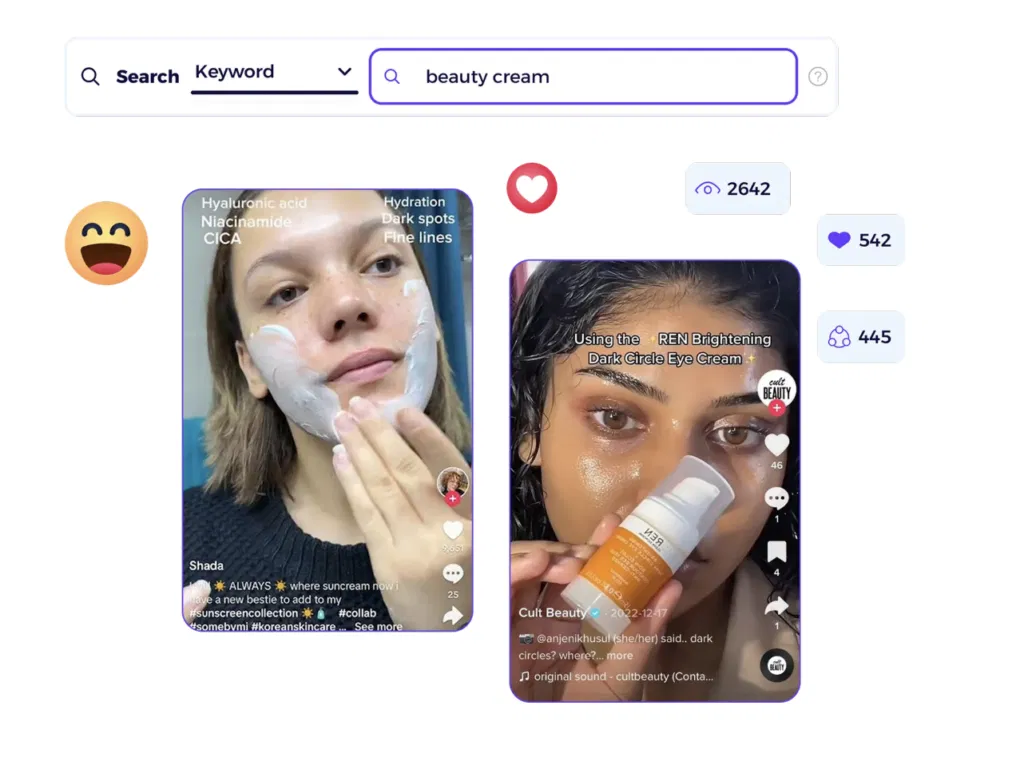
You can also search by keyword or niche to find live ads across multiple stores. For example, if you’re selling skincare products and want to see what other businesses are running, you can search “beauty cream,” and ZIK will show all the active ads in that category.
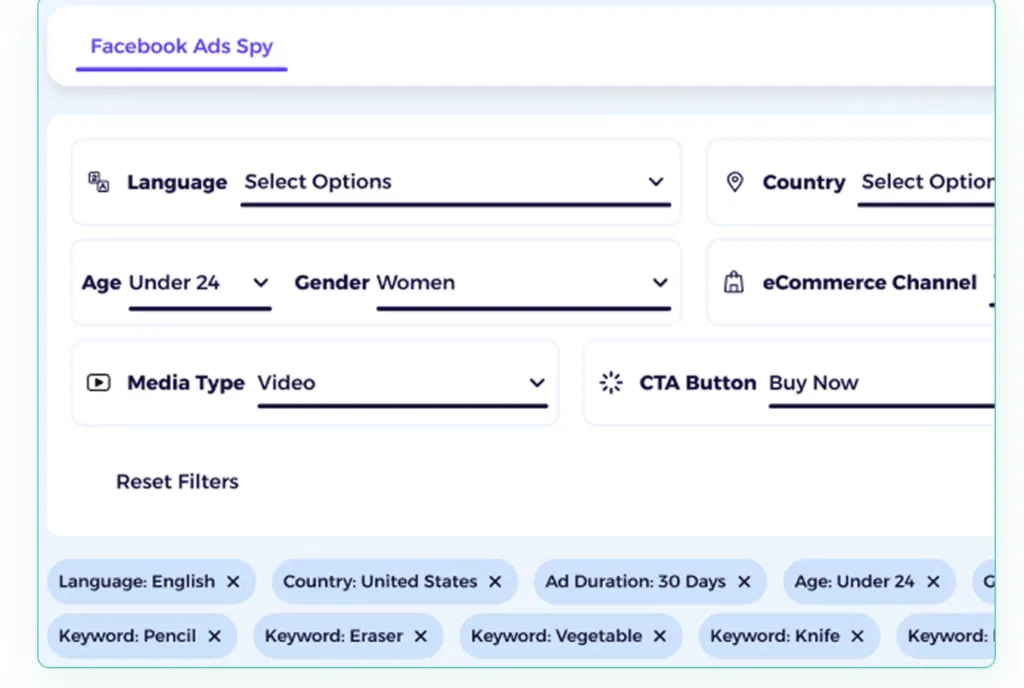
ZIK’s AdSpy lets you filter ads by age, gender, country, ecommerce type, media format, and ad duration. These filters help you see which ads target your ideal customer and which ones have enough traction to keep running.
With all this information at hand, you can build your own profitable marketing campaigns and cut down on wasted ad spend. To be more specific in your ad expenses and potential returns, you can use a ROAS calculator.
Can Dropshipping Be Fully Automated? (The Reality Check)
Now that you understand what dropshipping automation does, you might wonder if the whole business can run on autopilot.
The short answer is no. You can automate most routine work, but you still need to be present for the parts that require judgment and oversight.
Things You Can Automate
- Product imports: Tools can pull items from suppliers like AliExpress or Amazon and load product details into your store.
- Inventory and pricing: You can sync stock levels with suppliers and update prices automatically when their costs change.
- Order processing: Software can help you forward orders to suppliers and update tracking information in your store.
- Email automation: You can set up abandoned cart reminders, welcome emails, and promotional messages to send based on customer behavior.
Things That Still Need You
- Supplier management: You choose which dropshipping suppliers to work with and handle issues when they come up.
- Complex customer problems: Issues like damaged products or billing disputes need your personal attention and judgment.
- Strategy and growth: You decide which products to add and where your marketing budget goes.
- Marketing creativity: Automation delivers your messages, but you create the copy and content that resonates with buyers.
With all that said, you can still gain a lot from automating key parts of your dropshipping business. Many dropshippers use a combination of automation software and virtual assistants to handle different parts of their operations. You can try using the same strategy to see if it frees up your time for more important work.
Get the eBook and learn how to launch your one-product Shopify store right!Common Mistakes in Dropshipping Automation
Automation can save you time and help you scale, but a few mistakes can wipe out the benefits you gain.
Here are some common ones to avoid:
- Being too hands-off: Automation handles repetitive work, but you still need to check in on customer service and supplier issues.
- Using the wrong tools: Paying for software that doesn’t fit your needs or too many subscriptions at once can lead to financial strain.
- Relying on one supplier: If your only supplier runs out of stock or raises prices, you might need to pause your operation.
- Ignoring your data: Automation gives you sales numbers and buying patterns, but you need to analyze them to be able to make smart decisions.
- Skipping marketing: Tools won’t bring customers to your store. You still need ads and traffic strategies to get eyeballs on your business.
Automate Your Dropshipping Product Research with ZIK Analytics
Now that you know about the different ways to automate, you can start using these tools to gain the benefits we mentioned earlier in this guide.
Some of these tools can double in features, meaning you can get more out of them than just a single automation.
ZIK Analytics works as both a product research and competitor analysis tool. Our Shopify sales tracker shows you best sellers and revenue from any store. We also offer Shopify market insights to help you spot trending items in your niche.
Plus, our eBay product research tool lets you find winning items and analyze the market on eBay. This can be helpful if you want to get into eBay dropshipping or expand beyond Shopify.
Stop spending hours on manual research and order processing. Try ZIK Analytics and see how dropshipping automation helps you scale faster.
Frequently Asked Questions About Dropshipping Automation
In this section, I’ll answer the frequently asked questions about dropshipping automation.
Can you fully automate a dropshipping business?
No, you cannot fully automate a dropshipping business. However, you can automate most of the things involved in running it. For example, things like product research and competitor analysis can be automated using tools like ZIK Analytics. But tasks like customer service and marketing still require your input because they rely on nuance and judgment that only a human can provide.
What are the best dropshipping automation tools?
Some of the best dropshipping automation tools are:
- ZIK Analytics — Helps you find winning products on Shopify and conduct general research
- AutoDS — Automates importing and syncing so you spend less time on manual tasks.
- Spocket — Makes it easy to find US and EU suppliers with fast shipping and smooth order handling
- DSers — Streamlines AliExpress sourcing with bulk orders and supplier mapping
- Zendrop — Offers automated fulfillment and quick US-based shipping
How much does dropshipping automation cost?
There is no fixed cost for dropshipping automation, but it typically falls between $15 and $300 per month. The lower end covers basic tools that automate product importing or inventory syncing. The higher end applies when you add advanced software, larger product limits, and platform fees as your store scales.
Is dropshipping automation allowed on Shopify and eBay?
Yes, dropshipping automation is allowed on both Shopify and eBay. On Shopify, you can automate importing, syncing, and fulfillment using approved apps. On eBay, automation is fine as long as you work with wholesale suppliers. ZIK Analytics, which is popularly known for automating product research on eBay, can also help you automate key aspects of your Shopify dropshipping business.