
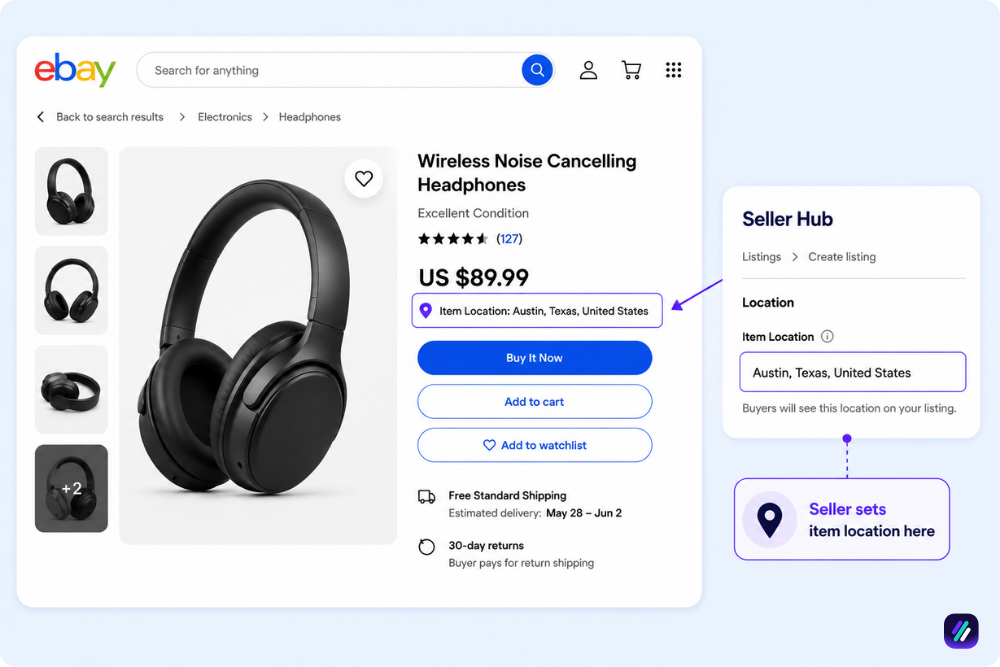
Most sellers treat the eBay item location field as a formality. You type a city once, copy it across every listing, and forget it. That small box, though, decides whether buyers can track your product and listing, whether your delivery dates are accurate, and how trustworthy you can be.
Setting it wrong, especially as a dropshipper, risks hidden listings, lower search placement, or a suspension you never saw coming.
In this guide, I will walk you through what eBay item location actually is, why it matters more than most sellers think, and how to change it in every scenario you will run into.
Key Takeaways
- eBay item location is the city and country your item ships from, shown on every listing and overseen by eBay’s official item location policy.
- The location has to stay consistent across your title, description, and item specifics, and it must match the tracking you upload after a sale.
- Accurate location drives three things buyers and eBay both care about: trust at checkout, placement in location-filtered search, and the delivery estimate eBay calculates for each buyer.
- Dropshippers carry the highest risk here. Your listed location must reflect where the item actually ships from, not where you happen to sit.
- Changing your location takes a different path for a brand-new listing, for live listings after a move, and for the default ship-from address that pre-fills everything.
- Before you list anything, the eBay Product Research Tool from ZIK Analytics shows what is actually selling in your category, so your location decision sits on top of genuine demand.
What is eBay Item Location?
eBay item location is the city, state, or region, and country you declare as the place an item ships from on a listing. Buyers see it near the price and shipping details, and eBay uses it to estimate delivery and to filter search results.
It is not your account’s registered address. The location is a per-listing field, so one seller can ship different items from different places and label each one honestly.
On the live listing, eBay treats that field as a promise about where the parcel starts its journey.
Unfortunately, most sellers set it once and never look again, then wonder why a buyer two states away expected next-day delivery. Keep in mind that this single field affects customer trust and shipping at the same time.
What is the eBay Item Location Policy?
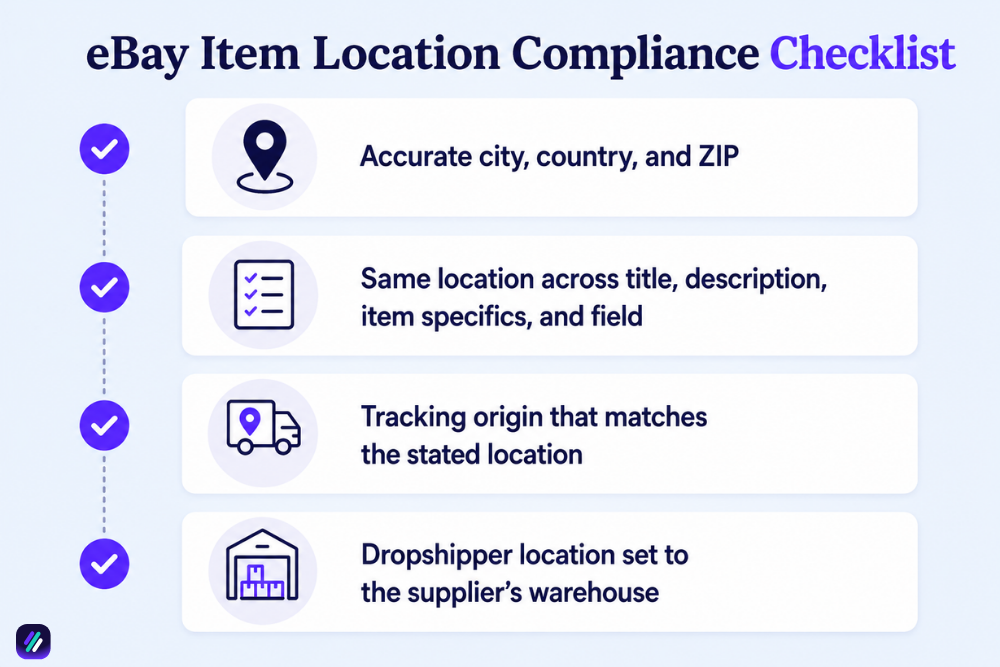
Every eBay listing must declare, accurately and consistently, where the item ships from. eBay’s item location policy requires the stated city and country to be genuine, consistent across the whole listing, and matched by the tracking you upload once the item sells.
eBay states this on its official item location policy page. Rather than copy the legal wording, this is what compliance looks like in practice:
- City and country, spelled out: the listing shows the city and country the item ships from, with an accurate ZIP or postal code behind it.
- Consistent everywhere: the location in your title, description, item specifics, and listing field all say the same thing. One mismatched line is enough to cause eBay management’s attention.
- Tracking that matches: the tracking number you upload at shipment has to originate from the location you stated. A US listing whose parcel ships from China is the classic red flag.
- True for dropshippers too: if you dropship, the stated location must reflect where the item originates, usually your supplier’s warehouse, not where you live.
Listings that break the policy can be hidden or demoted in search, ended outright, or stripped of seller protections, and repeat violations escalate to buying or selling restrictions and account suspension.
These requirements apply across eBay’s marketplaces, though the exact field labels differ a little by country and site. Treating item location with the same care as your other eBay business policies is far cheaper than earning a clean record back.
3 Types of eBay Addresses
Most location confusion comes from treating eBay as if it has one address. It actually has three, and they have different functions. This is how they compare, and which one buyers actually see:
| Address type | Where you set it | What it controls |
|---|---|---|
| Registered address | Account settings, under your personal info | Your account identity, billing, and tax details, which buyers never see |
| Default ship-from address | Account settings, or your shipping business policies | The location that pre-fills on new listings, plus where return labels point |
| Per-listing item location | The location field on each listing | What buyers actually see, and the field the item location policy governs |
And you manage all three from your eBay seller hub, though eBay relabels these menus often, so the exact path may differ from what you see today.
So the one that gets sellers in trouble is the third. Your registered address can stay private, and your default ship-from is a convenience, but the per-listing item location is public information you have to show.
Why is eBay Item Location Important?
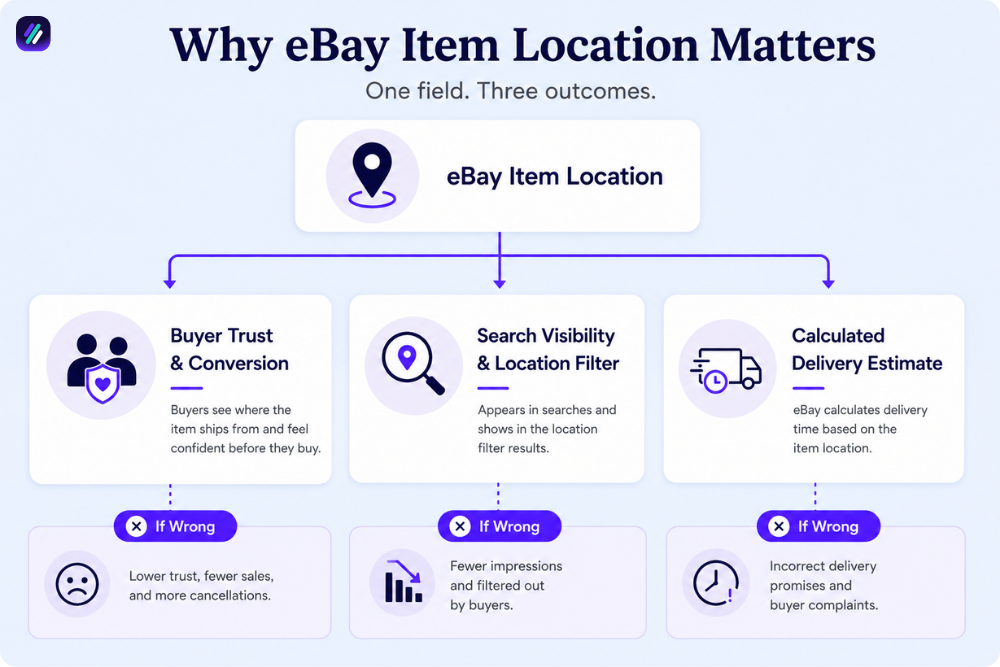
Item location matters because it shapes three decisions at once: if a buyer trusts and clicks your listing, if you appear when buyers filter by location, and how fast eBay promises delivery.
There is serious money riding on this. eBay enabled nearly $80 billion in sales across 135 million buyers, and 51% of that volume was generated outside the United States.
So a huge share of buyers are weighing domestic against international every time they shop, and your location is the first thing they read.
Buyer Trust and Conversion
Buyers read location as an indication of reliability. A listing that ships from their own country feels faster and lower-risk before they even check the delivery date.
From our in-house eBay sellers at ZIK, a clear domestic location is one of the underrated reasons two near-identical listings convert at different rates. When the location is mismatched, that trust evaporates, and a hesitant buyer just moves on to the next product.
Search Visibility and the Location Filter
Buyers not only scroll, but they also filter. eBay’s search includes an item location filter with options like US Only, North America, and Worldwide, and plenty of buyers set it to their own country and never look past it.
If your listing claims the wrong location, or none at all, you can be filtered out of results a buyer was ready to act on.
And this connects to how eBay ranks listings in the first place. Accurate location supports the relevance signals that eBay SEO and the eBay Cassini search engine reward, so it is part of visibility, not a separate admin chore.
Policy Compliance and Account Health
A wrong location puts your whole account at risk. eBay treats item location misrepresentation as a trust-and-safety issue, and the penalties climb from hidden listings to lost protections and, in repeat cases, an ebay account suspended notice you then have to appeal.
Keeping location accurate is one of the lowest-effort ways to protect account health, especially if you sell at volume.
Shipping is Estimated Based On This
This is the part sellers underestimate. eBay calculates the estimated delivery date partly from your item location and the buyer’s address, alongside your handling time and the carrier’s transit time. State a location far from where the item really ships, and eBay promises a date you cannot hit.
Late arrivals against an eBay estimate affect your metrics negatively and can pull you out of programs like eBay Guaranteed Delivery, where fast, accurate dates are the entire point.
How to Change eBay Item Location?
To change your eBay item location, edit the location field on an individual listing, use the bulk editor for many live listings at once, or update your default ship-from address in account settings. Which route you use depends on the situation.
Each scenario below covers one of those routes, and we will take them in order. One caveat first: eBay updates Seller Hub regularly, so a label may sit in a slightly different place than described here.
Scenario 1: Change eBay Item Location on a Single New Listing
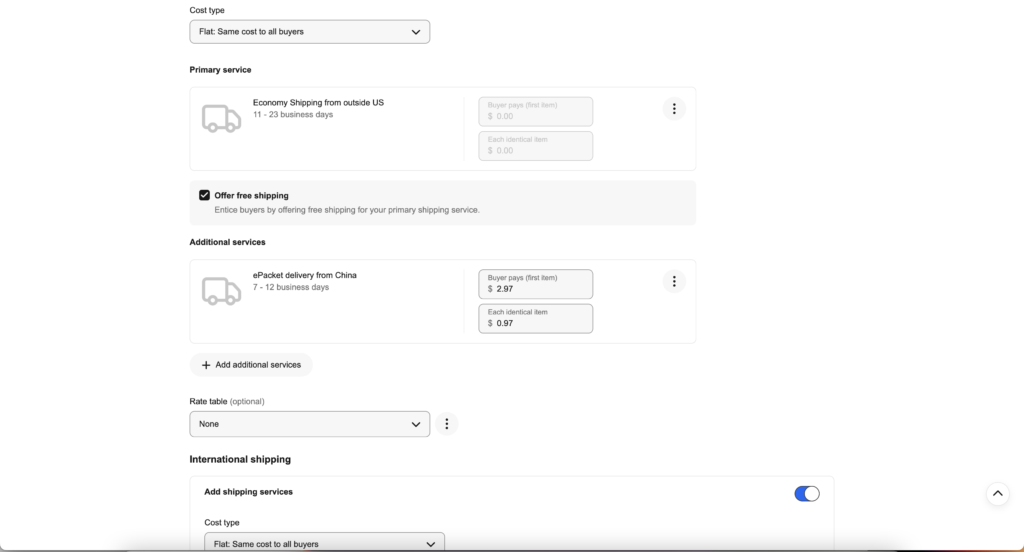
On a new listing, you can place it directly in the listing form. From the Seller Hub listing form, you scroll down to the item location field, which sits near the bottom under the shipping section and the exclude-shipping-locations option. You click Change, enter the correct city, country, and ZIP, then save.
Since you are already in the editor, this is also the moment to tidy everything else. Strong eBay listing optimization, accurate location included, is what separates a listing that converts from one that just exists.
Scenario 2: Change Item Location on Live Listings After Moving
Once you move, every live listing still shows your old location until you change it, and editing them one by one is painful at scale. But you can use a bulk editor.
From your active listings in Seller Hub, you select the listings you need, choose Edit, and update the ship-from ZIP or item location for the whole batch at once.
Scenario 3: Change Your Default Ship-From Address
Your default ship-from address is the one pre-filled for every new listing, so fixing it once saves you from repeating Scenario 1 forever.
You update it in your account settings, under addresses or your shipping business policies, by editing the ship-from and, if needed, the separate return address. New listings then inherit the corrected location automatically.
One thing to watch: your ship-from address also feeds the postage you are quoted, so an outdated one can affect your eBay shipping fees. Existing live listings will not update on their own, which is exactly why Scenario 2 exists.
The “Item Location Misrepresentation” Error on eBay
The item location misrepresentation error is eBay telling you directly that the location on your listing does not match the other filled location information. It usually surfaces in three situations:
- Address conflict: the listing location does not match your account or business-policy ship-from address.
- Invalid ZIP: the postal code you entered is not valid for the stated city and country.
- Tracking mismatch: the parcel’s tracking shows it originated somewhere other than the listed location.
Does eBay Item Location Need to Match Return Address?
No. Your item location and your return address do not have to be identical.
eBay lets your ship-from location and your return address differ, since returns sometimes route to a different warehouse, processor, or address than the one items ship from.
But what matters is that each one is accurate for its own job. The item location must reflect where the parcel ships from, and the return address must be a place that can actually receive and process returns.
When you set a ship-from that differs from your return address, eBay even gives you a checkbox to mark the two as separate.
Dropshipping and eBay Item Location: What Does the Policy Require?
For dropshippers, the rule is blunt: your item location must show where the item actually ships from, which is your supplier’s warehouse, not your home.
Listing a local address while your goods ship from overseas is exactly the misrepresentation eBay’s policy targets.
eBay’s dropshipping (product sourcing) policy only allows dropshipping when you source from a wholesale supplier, not when you buy from another retailer that ships straight to your buyer. Our deeper breakdown of the eBay Dropshipping Policy walks through what counts as compliant sourcing.
Either way, the location you publish has to be true. This is how it plays out in the situations dropshippers hit most:
- Listing home while shipping from China: putting your US address on a listing that ships from an overseas supplier is a direct violation, and the one eBay catches most. If you run an AliExpress to eBay dropshipping model, your item location is your supplier’s location.
- Multi-warehouse suppliers: when a supplier ships from several facilities, list the primary fulfillment location for that item, and update it if the routing actually changes.
- Faking local to look faster: setting a nearby location to seem domestic might lift clicks for a week, but it breaks delivery estimates and invites strikes. The same trap shows up in Alibaba to eBay sourcing, where lead times are long, and honesty about origin protects you.
- Auto-filled listing tools: automation that copies a single default location onto every imported product will misrepresent your catalog. You should check what your lister fills in.
From our in-house sellers at ZIK, the dropshippers who stay out of trouble simply treat the supplier’s location as the listing location every single time. If you want the full rulebook, our guide to eBay dropshipping covers what is allowed and what gets accounts banned.
And before you commit to any supplier, the eBay Product Research Tool shows which products are actually selling, so you build on demand instead of guesswork.
How to Edit eBay Return Address
Editing your return address is a quick account-level fix, separate from any single listing. So you set it once, and it applies to future returns rather than to live listings retroactively. You can do it in a few steps:
- Account settings: from Seller Hub or My eBay, you open Account settings and find the addresses section under your personal info.
- The return address: in the addresses area, you locate the return address, which is often listed separately from your registered and ship-from addresses, and choose to edit it.
- The correct details: you type the address that can actually receive returns, whether that is your own, a processor’s, or your supplier’s, then save.
- A test confirmation: on the next return request, you check that the prepaid label and instructions point to the right place before you approve.

Find eBay Best Selling Items with ZIK Analytics
An accurate eBay item location keeps you compliant and trusted, but it does not, on its own, put winning products in front of buyers. That part comes down to selling what people already want, and that is where ZIK Analytics earns its place:
- Use the eBay Product Research Tool to see actual sales, sell-through, and competition on any keyword before you commit to a listing.
- Use the eBay Competitor Research Tool to analyze any seller’s revenue, sold items, and best products, so you know exactly who you are up against.
- Use eBay Market Insights to catch trending products and keywords early, while the demand is still climbing.
Put together, that is how you stop guessing and start listing from data. You can try all of it on a $1 trial (7-day) and see what is actually selling in your niche this week.
Frequently Asked Questions About eBay Item Location
A few quick answers to the questions sellers ask most about eBay item location:
Where to put item location on eBay?
You set the item location in the listing form itself, near the bottom under the shipping section, beside the exclude-shipping-locations option. On a new listing, it pre-fills from your default ship-from address, but you can change it per listing. Whatever you enter is what buyers see, so it must match where the item actually ships from.
How to tell if a buyer is scamming you on eBay?
You can spot trouble when buyers push you off eBay, claim non-delivery on tracked items, or request returns that do not match what you sent. Item location plays a part, since scammers sometimes target listings with vague or foreign locations. You should keep communication on-platform, document everything, and report patterns through eBay’s resolution tools.
How to see where an eBay seller is located?
On any listing, the item location shows near the price and shipping details, and a seller’s wider location often appears on their profile or feedback page. To size up a competitor properly, the eBay Competitor Research Tool shows their sold items, revenue, and best products, so you understand the seller behind the location.
How to change seller location on eBay?
Your overall seller location is tied to your registered and ship-from addresses in account settings, not to a single listing. To change it, you update those addresses under your personal info, then refresh any live listings showing the old place. Changing your registered country is more involved and can affect payments and taxes.
Can you search eBay items by location?
Yes. eBay’s search includes an item location filter with options like US Only, North America, and Worldwide, so buyers can narrow results to items shipping from a chosen area. On the eBay app, you can even lock a default location filter, while desktop browsers reset it per search.
Does eBay display your address?
Not your full street address. eBay shows buyers the item location, usually the city, region, and country, plus your general seller location, but never your complete home address on a listing. Your full registered address stays private, used for billing, tax, and verification. Returns go to whatever return address you set.